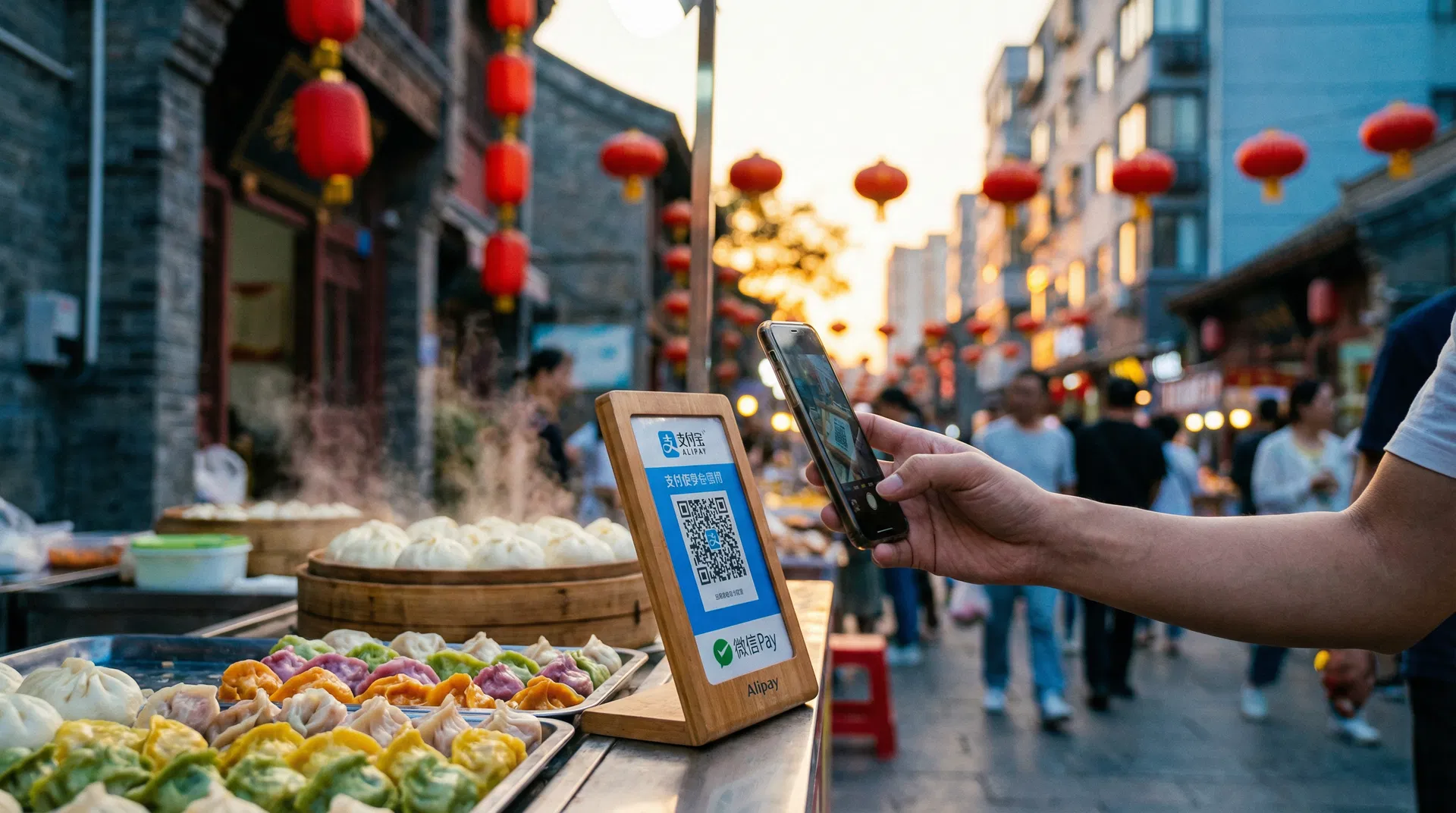
The Ultimate Guide to Paying in China
Everything you need to know about Alipay, WeChat Pay, and mobile payments as a foreigner visiting China. Set up before you land, pay like a local.
How Payments Work in China
China has rapidly become the world's most cashless society. Understanding your payment options before you arrive will save you significant stress and ensure a smooth travel experience.
Mobile Payments (Recommended)
essentialAlipay and WeChat Pay dominate China's payment landscape. Over 90% of daily transactions are made via QR codes. Linking your international card to these apps gives you the widest coverage — from street food vendors to luxury malls.
Cash (RMB/CNY)
backupCash is still legal tender and businesses must accept it by law. Carry small notes (¥10–¥50) as many vendors don't keep change. Works everywhere except online services like food delivery and ride-hailing apps.
International Credit Cards
limitedVisa and Mastercard are accepted at major hotels, department stores, and international chains, but coverage is unreliable. UnionPay cards have much wider acceptance. Best used as a backup, not your primary method.
Digital Wallets (Apple/Google Pay)
limitedApple Pay works at some NFC-enabled terminals but acceptance is much lower than Alipay/WeChat. Google Pay is NOT supported in mainland China as Google services are blocked. Neither is a reliable primary option.
The Bottom Line
Download and set up both Alipay and WeChat Pay before your trip. This gives you the widest coverage and a backup if one app has issues. Carry a small amount of cash (¥500–¥1,000) for emergencies. Your international credit card should be your last resort, not your first choice. Need help? Your AI Local Friend can guide you through the entire setup.
Mobile Payment Setup Guide
Follow these instructions to set up your payment apps before arriving in China. We recommend doing this at home where you have stable internet.
What You'll Need
Download & Register
Download the Alipay app from the App Store or Google Play. The international version defaults to English. Register using your mobile phone number — international numbers are accepted. You'll receive a verification code via SMS or an automated phone call.
⚠️ Download the correct app! Look for the blue icon with a white "支" character, published by "Alipay (Hangzhou) Technology Co., Ltd." Do NOT download "Alipay HK" (Hong Kong version) or "Tour Pass" (discontinued). Also note: e-SIMs often cannot receive SMS verification codes from Chinese services — use a physical SIM or register via email if possible.
Set Up Your Password
Follow the prompts to create a login password. You'll also need to set a 6-digit payment password — remember this, as you'll need it for every transaction.
Verify Your Identity
Tap "Me" (bottom right) → Settings (gear icon) → Account and Security → Identity Information. Tap "Basic Identity Information" and enter your name (Surname then Given Name, matching your passport), passport number, and expiry date. Then tap "Verification Photo" and upload a clear photo of your passport information page. This step is required to enable payments over ¥200 per transaction.
Complete Face Verification
Complete the facial recognition scan when prompted. This is a standard security measure. The process usually takes just a few seconds. Once approved, your annual transaction limit increases to $50,000 USD with single transactions up to $5,000 USD.
Add Your International Bank Card
Go to "Me" tab → "Bank Cards" → "Add Card". Enter your card number, expiry date, CVV, and country. Alipay accepts Visa, Mastercard, JCB, Diners Club, Discover, and UnionPay cards. Some cards may not work — if that happens, try a different card.
⚠️ American Express (Amex) is NOT supported by Alipay. If you only have an Amex card, you'll need an alternative. A Wise debit card (Visa) is a great backup — it offers real mid-market exchange rates and can be linked to Alipay.
Start Paying!
You're all set. Use the "Scan" button on the home screen to scan merchant QR codes, or tap "Pay" to show your own QR code for the cashier to scan. Each payment requires your 6-digit payment password or biometric verification.
Alipay TourCard
Alipay also offers TourCard — a prepaid option valid for 180 days with up to ¥10,000 balance. Search "TourCard" in the app. The 5% top-up fee can be cheaper than paying 3% per transaction on larger purchases.
💡 Wise Card Backup
A Wise debit card (Visa) is a great backup — real mid-market exchange rates, links to Alipay, and works as a regular Visa internationally. Order one before your trip.
Stuck on a setup step?
Your AI Local Friend walks you through Alipay & WeChat Pay setup, personalized to your phone and cards.
Alipay vs WeChat Pay
A detailed comparison to help you understand the differences. We recommend setting up both, but if you can only choose one, Alipay is generally the better option for foreign visitors.
| Feature | Alipay | WeChat Pay | Edge |
|---|---|---|---|
| Foreigner Friendliness | More foreigner-friendly, easier verification | Stricter verification, can be challenging | |
| App Language | English (International version) | English available in settings | |
| Accepted Cards | Visa, MC, JCB, Diners, Discover, UnionPay (no Amex) | Visa, Mastercard (credit only) | |
| Debit Card Support | Yes — debit and credit cards | No — credit cards only | |
| Restaurant QR Ordering | Sometimes works | Essential — 80% of QR menus use WeChat mini-programs | |
| Metro / Transit | Built-in transport codes, easy setup | Mini-programs, often needs +86 number | |
| Per-Transaction Limit | ¥5,000 (~$700 USD) | ¥6,500 (~$900 USD) | |
| Monthly Limit | ¥50,000 (~$7,000 USD) | ¥50,000 (~$7,000 USD) | |
| Annual Limit | ¥60,000 (~$8,400 USD) | ¥60,000 (~$8,400 USD) | |
| Fee Under ¥200 | Free (0%) | Free (0%) | |
| Fee Over ¥200 | 3% service fee | 3% service fee | |
| P2P Transfers | Not available with foreign cards | Not available with foreign cards | |
| Red Packets (红包) | Not available with foreign cards | Not available with foreign cards | |
| Transport Integration | Metro, buses, Didi ride-hailing | Metro, buses via mini-programs | |
| Food Delivery | Built-in Ele.me / Takeout feature | Via Meituan mini-program | |
| TourCard (Prepaid) | Yes — up to ¥10,000, 180 days, 5% top-up fee | Not available | |
| Customer Support | +86 571 2688 6000 | 95017 / +86 571 95017 |
Foreigner Friendliness
App Language
Accepted Cards
Debit Card Support
Restaurant QR Ordering
Metro / Transit
Per-Transaction Limit
Monthly Limit
Annual Limit
Fee Under ¥200
Fee Over ¥200
P2P Transfers
Red Packets (红包)
Transport Integration
Food Delivery
TourCard (Prepaid)
Customer Support
How to Actually Pay
There are two ways to pay with QR codes in China. Understanding the difference will save you from awkward moments at the checkout counter.
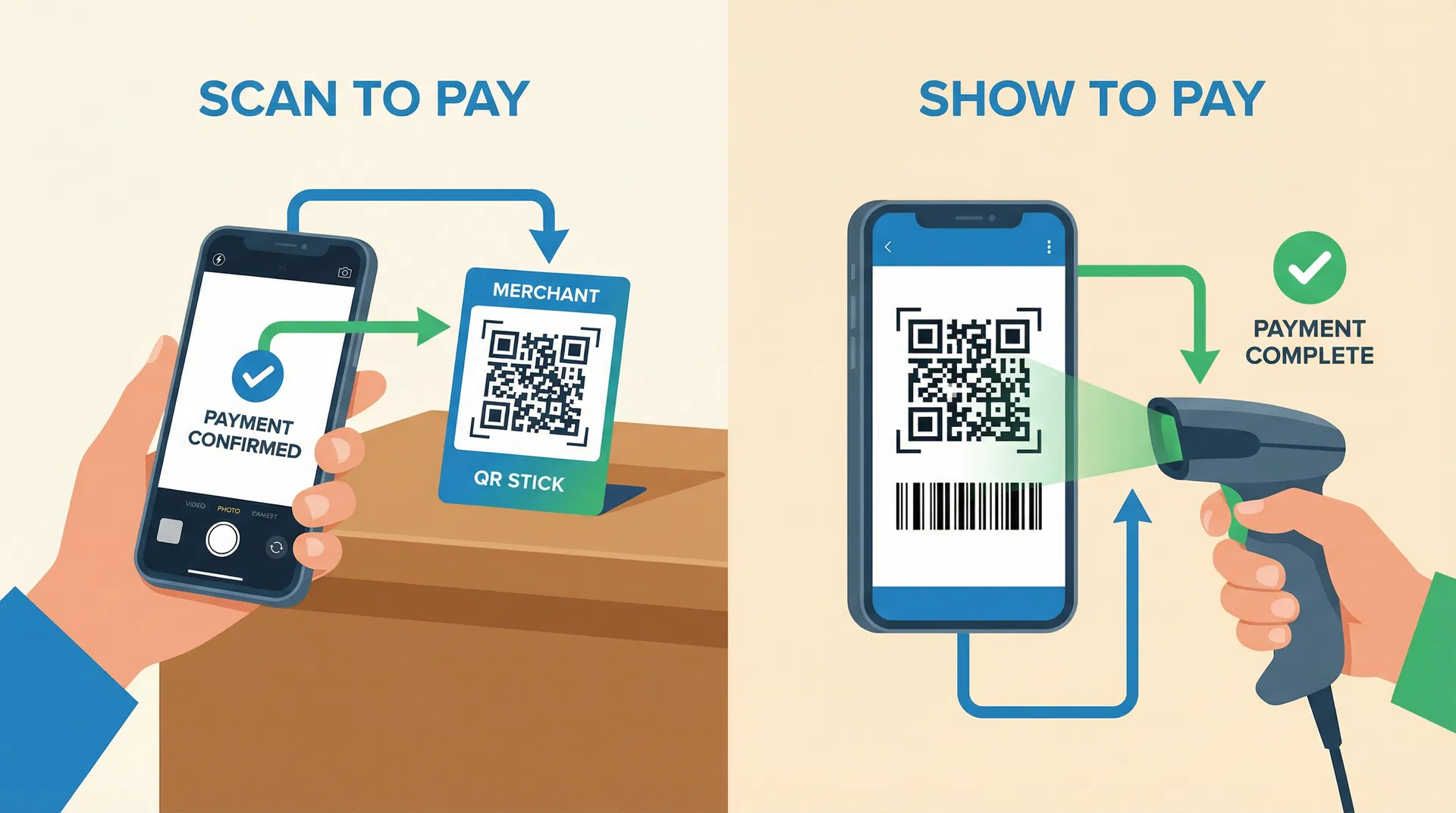
“Scan” — You Scan Them
Open your app and tap the Scan button (top-left in Alipay, or top-right “+” in WeChat). Point your camera at the merchant's QR code sticker — usually displayed on the counter or wall. The payment amount may auto-fill or you'll enter it manually.
“Pay Code” — They Scan You
Tap the Pay/Receive button to display your personal QR/barcode. Show your phone screen to the cashier, who will scan it with their scanner device. The code auto-refreshes every 60 seconds for security. Confirm with your payment password or biometrics.
Quick Tip: Know Which Method Before You Queue
Look at the checkout area before you reach the front of the line. If you see a QR code sticker on the counter, you'll need to scan it (Method 1). If you see a barcode scanner device, they'll scan you (Method 2). In larger stores, the cashier will usually say “扫一扫” (sǎo yī sǎo — scan) or point to indicate which method to use.
Real-World Payment Scenarios
Here's exactly what to expect in common situations. Knowing these scenarios in advance will make you feel like a local.
Restaurant QR Ordering
WeChatYou sit down and there's only a QR code on the table. Scan with WeChat (not Alipay — 80% of restaurant QR menus open WeChat mini-programs). The menu appears in Chinese, you order and pay within WeChat. Use the translate feature or take a screenshot and use Google Translate.
Street Food Vendor
Either AppThe vendor has a printed QR code on their stall. Green border = WeChat, Blue border = Alipay. Open the corresponding app, tap "Scan", point at the code, enter the amount the vendor tells you, confirm. Done in 5 seconds.
Metro / Subway
AlipayOpen Alipay → search "Transport" → select your city → generate QR code → scan at the turnstile. Much easier than buying single tickets at machines with cash. Works in Shanghai, Beijing, Guangzhou, Shenzhen, and 30+ other cities.
Luckin' Coffee / Chain Stores
Either AppMobile payment ONLY — no cash accepted. This is increasingly common at chain stores like Luckin' Coffee, Manner, and some convenience stores. You'll order through the app or a kiosk and pay via Alipay or WeChat.
Didi Ride-Hailing
AlipayBook through the Didi app (download separately) or use Alipay's built-in Didi mini-program. Enter your destination, confirm the ride, and pay with Alipay when the ride ends. Didi has an English interface for foreigners.
Fees & Transaction Limits
Both apps charge the same fees for international card users. Understanding the fee structure helps you minimize costs during your trip.
The Real Cost: Up to 6% on Larger Purchases
The 3% platform fee is just the start. Your bank may also charge a foreign transaction fee (typically 1–3%) and apply their own exchange rate markup. This means a ¥500 restaurant bill could cost you up to 6% more than the sticker price.
How to Minimize Fees
Transaction Limits
| Limit Type | Alipay | WeChat Pay |
|---|---|---|
| Per Transaction | ¥5,000 (~$700) | ¥6,500 (~$900) |
| Monthly Cap | ¥50,000 (~$7,000) | ¥50,000 (~$7,000) |
| Annual Cap | ¥60,000 (~$8,400) | ¥60,000 (~$8,400) |
| Without ID Verification | ~$2,000/year | Limited |
| With ID Verification | Up to $50,000/yr | Standard limits |
What International Cards Cannot Do
International cards are for consumption only — purchases at merchants, both online and in physical stores. All other financial features require a Chinese bank account.
Troubleshooting Guide
Common problems and their solutions. Bookmark this section — you may need it during your trip.
| Problem | Solution | Frequency |
|---|---|---|
Card won't link | Call your bank to whitelist Chinese transactions (Alipay/Tenpay). Try a different card. Consider getting a Wise debit card (Visa) as a reliable backup. | Common |
Payment declined at vendor | Try the other app (switch between Alipay/WeChat). Check your internet connection. Offer cash as a backup. Some vendors only accept one app. | Occasional |
Phone battery died | This is why you carry ¥500+ cash and a portable charger at all times. Shared power bank stations (Jiedian) are everywhere — but you need a working phone to rent one. | Common |
WeChat suspicious activity flag | Common for new accounts. Wait 24 hours and try again. If friend verification is required, ask hotel staff or post in expat groups online. | Occasional |
Downloaded wrong Alipay app | Delete it and re-download the correct one. Look for the blue icon with white "支" character by "Alipay (Hangzhou) Technology Co., Ltd." — not "Alipay HK" or "Tour Pass". | Rare |
No SMS verification code | Wait 2-3 minutes for international SMS delivery. If using an e-SIM, try email registration instead. Switch to a physical SIM if available. Try requesting the code again. | Occasional |
Call your bank to whitelist Chinese transactions (Alipay/Tenpay). Try a different card. Consider getting a Wise debit card (Visa) as a reliable backup.
Try the other app (switch between Alipay/WeChat). Check your internet connection. Offer cash as a backup. Some vendors only accept one app.
This is why you carry ¥500+ cash and a portable charger at all times. Shared power bank stations (Jiedian) are everywhere — but you need a working phone to rent one.
Common for new accounts. Wait 24 hours and try again. If friend verification is required, ask hotel staff or post in expat groups online.
Delete it and re-download the correct one. Look for the blue icon with white "支" character by "Alipay (Hangzhou) Technology Co., Ltd." — not "Alipay HK" or "Tour Pass".
Wait 2-3 minutes for international SMS delivery. If using an e-SIM, try email registration instead. Switch to a physical SIM if available. Try requesting the code again.
Hit a payment issue in China?
Describe your problem and your AI Local Friend will troubleshoot it in real time.
Pre-Trip Checklist
Use this interactive checklist to make sure you're fully prepared. Check off each item as you complete it.
One Week Before
Day Before Departure
On Arrival in China

Insider Tips for Smooth Payments
Practical advice from experienced China travelers to help you avoid common pitfalls and make the most of mobile payments.
Set Up Before You Fly
Complete registration, identity verification, and card linking at home where you have stable internet and can receive SMS codes. The verification process can take 24–48 hours in some cases.
Get a VPN Ready
Google, WhatsApp, Instagram, and Facebook are blocked in China. Download and configure a VPN before you arrive. Alipay and WeChat work without a VPN, but you'll want one for everything else.
Keep Your Phone Charged
Your phone is your wallet in China. Carry a power bank at all times. Shared power bank rental stations are everywhere — you can rent one by scanning a QR code with Alipay or WeChat.
Get an eSIM or Local SIM
You need mobile data for QR payments. An eSIM (like Airalo or Holafly) is the easiest option. Alternatively, buy a local SIM at the airport.
Download Offline Maps
Google Maps doesn't work well in China. Download Amap (高德地图) or Baidu Maps before your trip. Both integrate with Alipay for ride-hailing and public transport.
Use Mini-Programs for Food
Many restaurants use QR code ordering — scan the code on your table to view the menu and order from your phone. Payment goes through Alipay or WeChat automatically.
Transport Cards in Apps
Both Alipay and WeChat offer virtual transit cards for metro and buses in major cities. Search for 'Transport Card' or '乘车码' in the app.
Split Large Purchases
If your purchase exceeds the per-transaction limit (¥5,000 for Alipay, ¥6,500 for WeChat), ask the merchant to split it into multiple transactions.
Frequently Asked Questions
Answers to the most common questions from travelers setting up mobile payments in China for the first time.
Ready to set up payments?
Your AI Local Friend walks you through every step — from downloading the apps to making your first payment — personalized to your phone, cards, and travel dates.
Ask Your AI Local FriendFree. No sign-up. Works on any device.